
FXS Gateway / Analog Telephone Adapter
1. What's in the Box
Check the package before installation. Contact your system administrator if anything is missing.
1x HT812 or HT814 adapter
1x 12V Power Adapter (0.5A for HT812 / 1A for HT814)
1x Ethernet Cable (RJ45)
1x Quick Installation Guide
⚠ Warning: Only use the 12V power adapter that came with the device. Using a different adapter may damage the unit and void the warranty.
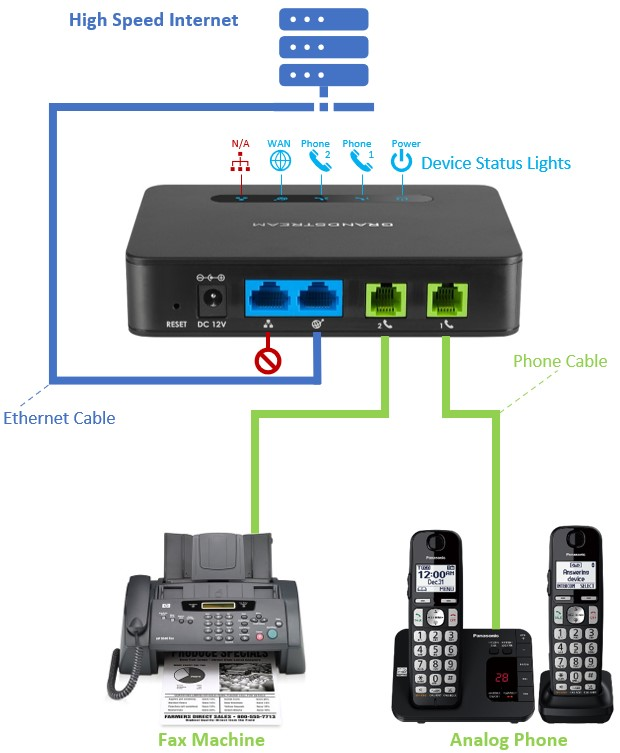
2. Know Your Ports (back panel)
- Reset Pinhole button — press and hold for 7 seconds to factory reset
- DC 12V Power adapter input
- LAN Ethernet / NET2 (RJ45) — connect to a PC or other device (optional)
- WAN Ethernet / NET1 (RJ45) — connects to your switch/router for internet
- Phone 2 RJ-11 phone jack — primary analog phone or fax
- Phone 1 RJ-11 phone jack — second phone or fax (HT812 has 2; HT814 has 4)
3. Connect Your Device
Step 1 —Connect your phone(s).
Plug a standard RJ-11 telephone cable into a Phone port and connect the other end to your analog phone, cordless phone base, or fax machine.
Step 2 —Connect to the internet.
Using the included Ethernet cable, connect the WAN port to your router, switch, or modem.
Step 3 —Connect power.
Plug the included 12V power adapter into the DC 12V port and into a wall outlet. The Power LED will light up and flash while booting.
Step 4 —Wait for startup.
Allow 1–2 minutes for the adapter to boot and register with your VoIP service. The device is ready when the Power, WAN, and Phone LEDs are all solidly lit blue.
Step 5 —Test.
Pick up the phone and listen for a dial tone. Try making a test call to confirm everything is working.
💡 Optional — LAN port: You can also connect a computer to the LAN port. This way you can plug the FXS Gateway in at a location if there is already a device using the only ethernet wall port.
LEDs / Indicators
|
LED |
Status / Meaning |
|
|
Power |
Solid |
Device is on |
|
|
Flashing |
Device is booting up |
|
WAN |
Solid |
Connected to network via WAN port |
|
LAN |
Solid |
Connected to network via LAN port |
|
Phone 1/2 |
Solid Blue |
SIP account registered & ready |
|
|
OFF |
SIP account not registered |
|
|
Fast Blink |
Phone is off-hook or busy |
|
|
Slow Blink |
You have a voicemail |